
The last notes
Website hosting
If you are choosing hosting for your project, I recommend Timeweb. Modern infrastructure, a wide range of plans from starter options to high-load VPS, and responsive tech support that actually helps instead of sending template replies. I host some of my own projects there and recommend it to my clients.
Go to site Affiliate link. The price remains the same for you.All English-language materials have been translated fully automatically using the Google service
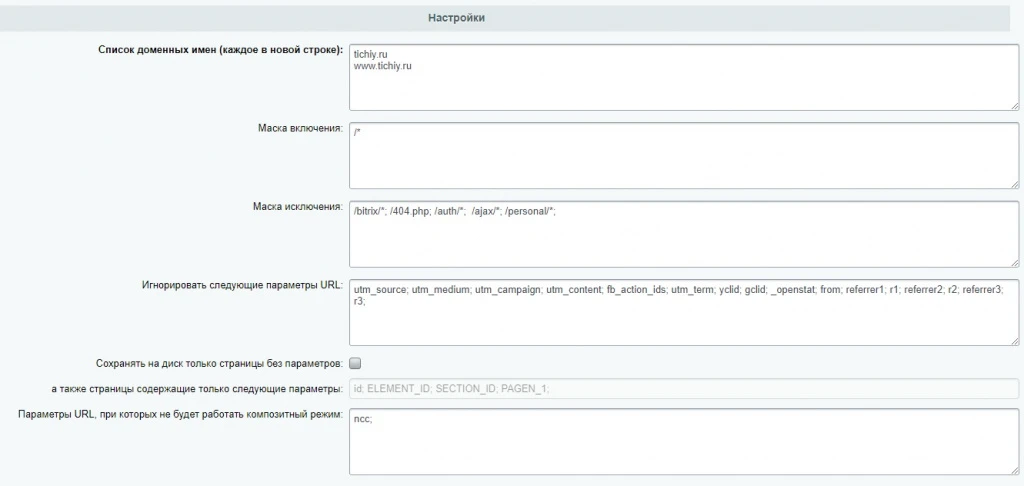
First, go to /bitrix/admin/composite.php?lang=en and open the Settings item. These settings will be enough:
Turn on logging
 define ("BX_COMPOSITE_DEBUG", true);
define ("LOG_FILENAME", $ _SERVER ["DOCUMENT_ROOT"]. "/ log.txt");
Dynamic content outside of a component, for example in a template
\Bitrix\Main\Page\Frame::getInstance()->startDynamicWithID("dynamic-area");

\Bitrix\Main\Page\Frame::getInstance()->finishDynamicWithID("dynamic-area", "Загрузка...");
Dynamic buffered content
$frame = new \Bitrix\Main\Page\FrameHelper("dynamic-area");
$frame->begin();
   //динамический контент
$frame->beginStub();
  //заглушка
$frame->end();
Dynamic area with browser cache. Load statics from the last hit
 $ frame = $this->createFrame('dynamic-area')->begin('');
$ frame-> setBrowserStorage (true);
// Content
$ frame-> end ();
Dynamic area with spawn animation
 $ frame = $this->createFrame('dynamic-area')->begin('');
$ frame-> setAnimation (true);
 // Content
$ frame-> end ();
Partial component caching. For example, when showing the current price
$frame = $this->createFrame('price-index', false)->begin()
	echo $price;
$frame->beginStub()
	echo 'руб.';
$frame->end()
Disable Composite Caching
\Bitrix\Main\Data\StaticHtmlCache::getInstance()->markNonCacheable();Removing Composite Cache via API
$staticHtmlCache = \Bitrix\Main\Data\StaticHtmlCache::getInstance();

$staticHtmlCache->deleteAll();
Composite and Region Dependent Content
In the init.php file, override the method that generates the file name in the composite cache.
class CacheProvider extends Bitrix\Main\Data\StaticCacheProvider
{
public static function createKey()
{
	global $USER;
	$page_name = "page";
	if(!empty($_SESSION["CITY_ID"]))
		$page_name .= "_region_".$_SESSION["CITY_ID"];

	return $page_name;
}
public function setUserPrivateKey(){}
public function isCacheable()
{
	return true;
}
public function getCachePrivateKey()
{
	return self::createKey();
}
public function onBeforeEndBufferContent(){}
}
In the city definition component (for example articul.geolocation.detect_ip / component.php ) write the cookie BITRIX_SM_PK
setcookie("BITRIX_SM_PK", 'page_region_'.$_SESSION["CITY_ID"], $cookie_life, "/", constant("COOKIE_DOMAIN")); In the file /local/php_interface/composite_first_start_cookie_fix.php we write the cookie BITRIX_SM_PK so that the composite will also work out on the first visit (we include this file BEFORE header. php on composite pages):
Original solution here
Worth reading:

Comments