
The last notes
Website hosting
If you are choosing hosting for your project, I recommend Timeweb. Modern infrastructure, a wide range of plans from starter options to high-load VPS, and responsive tech support that actually helps instead of sending template replies. I host some of my own projects there and recommend it to my clients.
Go to site Affiliate link. The price remains the same for you.All English-language materials have been translated fully automatically using the Google service
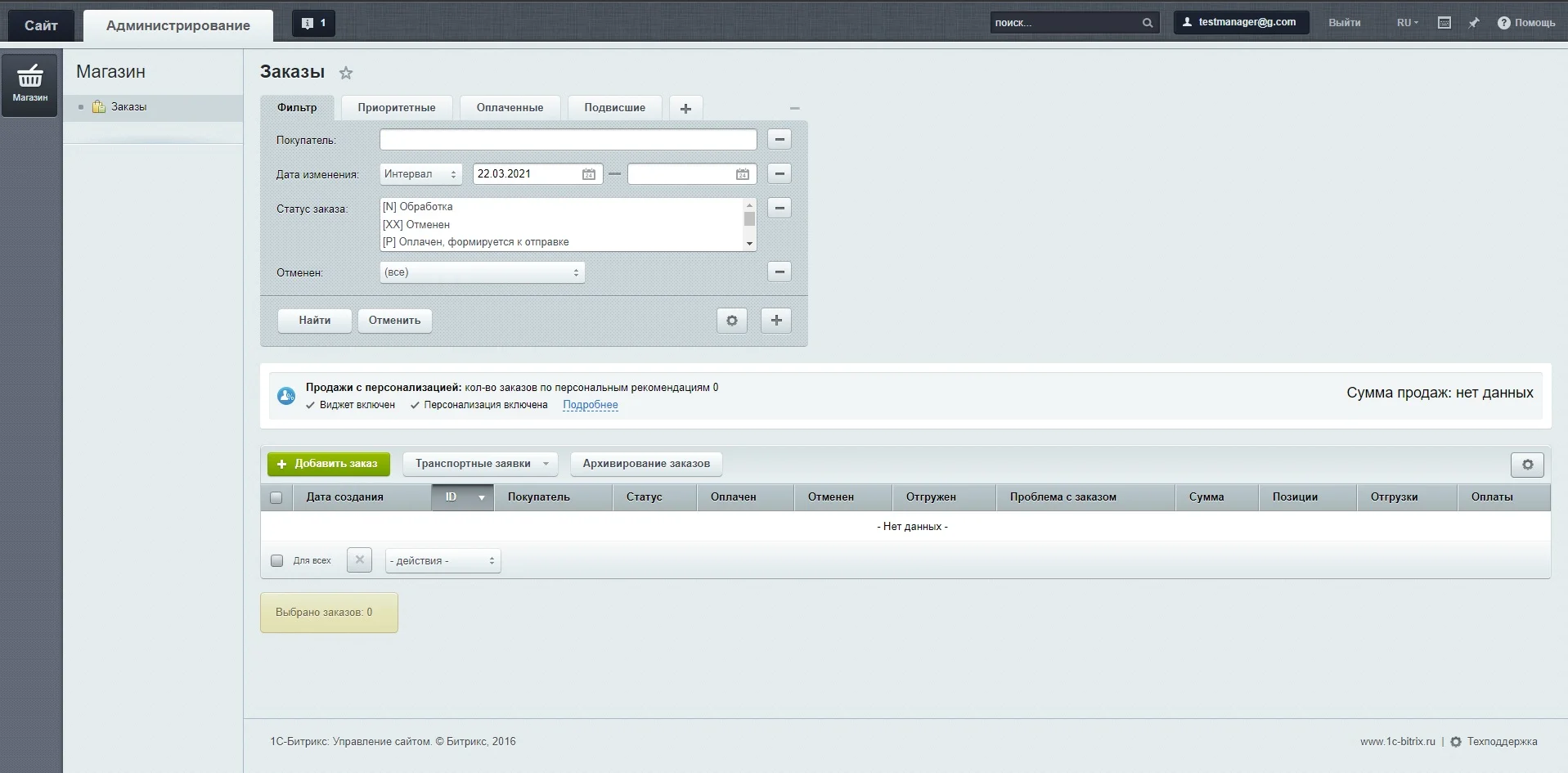
On assignment, I had to leave only the "Store" tab in the admin area, and in it "Orders" for a specific group of users.
In the php.init file, add the OnBuildGlobalMenu
AddEventHandler("main", "OnBuildGlobalMenu", "MyOnBuildGlobalMenu");
function MyOnBuildGlobalMenu(&$aGlobalMenu, &$aModuleMenu)
{
    global $USER;
    if (CSite::InGroup([6])) {
        unset(
            $aGlobalMenu["global_menu_desktop"],
            $aGlobalMenu["global_menu_content"],
            $aGlobalMenu["global_menu_landing"],
            $aGlobalMenu["global_menu_marketing"],
            $aGlobalMenu["global_menu_settings"],
            $aGlobalMenu["global_menu_marketplace"],
            $aGlobalMenu["global_menu_services"],
            $aGlobalMenu["global_menu_statistics"]
        );

        $destroy = ["global_menu_desktop", "global_menu_content", "global_menu_landing", "global_menu_marketing", "global_menu_settings", "global_menu_marketplace", "global_menu_services", "global_menu_statistics"];

        foreach ($aModuleMenu as $k => $v) {

            /* Disable all submenus in orders */
            if ($v['parent_menu'] == 'global_menu_store')
                unset($aModuleMenu[$k]['items']);

            if (in_array($v['parent_menu'], $destroy) || $v['text'] == 'Покупатели') {
                unset($aModuleMenu[$k]);
            }

        }
    }

}
This is not enough, because the link "Go to Bitrix24" will remain in the left menu, and next to the orders "Product catalog"
Create admin_header.php file in php_interface and add
<?php

if(CSite::InGroup([6])){
    global $adminMenu;

    //Hide the button "Go to Bitrix24"
    unset($adminMenu->aGlobalMenu['global_menu_crm_site_master']);

    foreach ($adminMenu->aGlobalMenu['global_menu_store']['items'] as $k => $v){
        if($v['title'] != 'Список заказов'){
            unset($adminMenu->aGlobalMenu['global_menu_store']['items'][$k]);
        }
    }

    //Hide bread crumbs and a menu with a product catalog in the "Orders" submenu
    ?>
    <style>
        #main_navchain {display: none}
        .adm-detail-toolbar > a {display: none}
    </style>
    <?php
}
In orders, the user will still be able to go to the editing of the product, but I did not need to change it. If you know how to do this, then write)
Do not forget to set the access settings to the required user group in the "Access" tab
Main module: Change your profile
Online store: Order processing
Other access can be closed
You can also assign access to the corresponding order statuses in Store> Store settings> Statuses
The page looks like this:
Worth reading:

Comments